
In this blog post, you will get to know ClickHouse, a high-performance column-oriented database that plays a critical role in modern data architectures. It is especially valuable for organizations that need to process and analyze large volumes of data in real time, with millisecond-level latency and efficient resource usage.
Whether you’re building internal analytics tools, serving customer-facing dashboards, or running complex event-based pipelines, understanding ClickHouse can be a key differentiator for your data stack.
ClickHouse is designed to answer one fundamental challenge: how to analyze billions of rows of data quickly, efficiently, and cost-effectively. With its unique approach to columnar storage and execution, it stands out as one of the fastest and most scalable solutions in the open-source analytics ecosystem.

This article will guide you through:
What ClickHouse is and how it works at a low level
The architecture that makes it so fast
Comparisons with other analytical databases like PostgreSQL, BigQuery, Druid, and Snowflake
Practical use cases and real-world deployment scenarios
Example schemas and queries optimized for performance
Common pitfalls and when not to use ClickHouse
Best practices for tuning and running ClickHouse in production
Let’s dive deep into the internals and understand why ClickHouse has become a foundational component for companies that take data seriously.
What is ClickHouse?
ClickHouse is a high-performance, open-source columnar database management system (DBMS) designed for online analytical processing (OLAP). It was developed by Yandex to power Yandex.Metrica, their web analytics platform, and open-sourced in 2016 under the Apache 2.0 license.
Unlike traditional row-based systems that store entire records together, ClickHouse stores each column separately. This layout dramatically improves performance for queries that access a subset of columns over very large datasets, making it ideal for analytics.
ClickHouse is not a general-purpose transactional database. Instead, it is optimized for scenarios where reads are frequent, data is mostly immutable, and performance at scale is essential.
How ClickHouse works: key architectural principles
ClickHouse achieves its performance through a set of architectural decisions, each designed to optimize read-heavy, analytical workloads:
Column-Oriented Storage
ClickHouse stores data in columns instead of rows. This provides several advantages:
Only the columns required by a query are read from disk
Similar values stored sequentially lead to better compression
Enables vectorized processing and memory-efficient scans
This model is optimal for queries involving aggregations, filters, and joins on large datasets.
Vectorized Execution Engine
ClickHouse uses vectorized query execution, which processes data in blocks instead of row-by-row. This enables:
Reduced instruction overhead
Better CPU cache utilization
Use of SIMD instructions for arithmetic and filtering
This execution model leads to significant performance gains for analytical queries.
Compression and Encoding
ClickHouse uses multiple levels of compression to reduce storage and improve I/O efficiency:
LZ4 is the default codec for fast compression/decompression
ZSTD provides a higher compression ratio for archival data
Specialized encodings like Delta and Gorilla are used for time-series
Compression is applied at the block level, and columnar data lends itself well to pattern-based compression.
MergeTree Table Engines
Most tables in ClickHouse are based on the MergeTree family of engines, which provide:
Sorted, partitioned data for efficient querying
Background merging of data parts for performance optimization
Support for various features like deduplication and aggregation
Variants include:
MergeTree: general-purpose engineReplacingMergeTree: handles deduplicationSummingMergeTree: automatically aggregates numeric columnsAggregatingMergeTree: stores pre-aggregated states for fast GROUP BY
Distributed Query Processing
ClickHouse supports distributed clusters with data sharded and replicated across multiple nodes. The query planner pushes down operations like filtering and aggregation to minimize inter-node communication.
A single query can be executed in parallel across dozens or hundreds of machines, delivering near-linear scalability.
Comparing ClickHouse with other analytical Databases
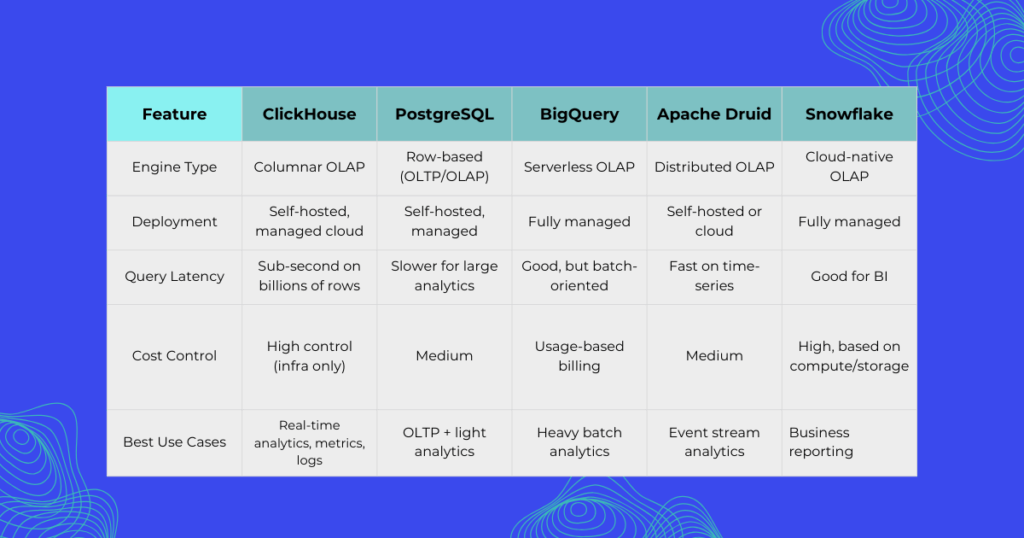
Choosing the right analytical database depends on your requirements. Here is a technical comparison of ClickHouse with popular alternatives:

ClickHouse offers a unique balance: high-performance analytics with full control over infrastructure and cost, without requiring vendor lock-in.
Real-world use cases of ClickHouse
ClickHouse is used in production by thousands of organizations across various industries. Common use cases include:
Product and User Analytics
Track user behavior, page views, clicks, sessions, and conversion funnels with sub-second response time. Used by SaaS platforms for customer-facing dashboards.
Real-Time Monitoring and Observability
Process logs and metrics from infrastructure or applications at scale. An alternative to ELK or Prometheus + Grafana for high-cardinality datasets.
AdTech and Marketing Attribution
Ingest and aggregate billions of ad impressions and clicks. ClickHouse supports high-throughput pipelines and real-time performance reporting.
Financial Market Data
Process tick-level trading data and perform low-latency analysis. ClickHouse’s compression and time-series capabilities make it ideal for this domain.
Schema design and Query examples
Designing an efficient schema in ClickHouse involves choosing the right engine, sort keys, and partitioning.
Example Table: User Events
CREATE TABLE user_events
(
event_time DateTime,
user_id UUID,
event_type LowCardinality(String),
event_properties Map(String, String),
device_type LowCardinality(String)
)
ENGINE = MergeTree()
PARTITION BY toYYYYMM(event_time)
ORDER BY (event_time, user_id);
Aggregation Query
SELECT
device_type,
count(*) AS total_events,
uniqExact(user_id) AS unique_users
FROM user_events
WHERE event_time >= now() - INTERVAL 1 DAY
GROUP BY device_type
ORDER BY total_events DESC;
This query performs fast aggregations over potentially billions of rows, returning results in under 200 milliseconds depending on hardware.
Limitations and when not to use ClickHouse
ClickHouse is not suitable for every workload. You should consider other solutions if:
You need full transactional support (ACID, row-level locks)
Your application performs frequent updates or deletes
You require flexible, schema-less document storage
You need strong consistency guarantees across nodes
ClickHouse is not a replacement for OLTP systems or document databases. It is designed for append-only, read-heavy analytical pipelines.
Best practices for Production Deployment
To ensure performance and reliability in production environments, choose sort keys based on your most frequent query filters, use LowCardinality for string columns with few distinct values, and partition large tables by time or logical separation, such as customer ID. When possible, pre-aggregate data using materialized views, closely monitor merge operations and disk usage, and use NVMe SSDs and plenty of memory on storage nodes.
It’s also important to enable compression codecs appropriately based on data access patterns. ClickHouse can be deployed using containers, Kubernetes operators, or managed services such as ClickHouse Cloud, Aiven, or Altinity.Cloud.
Wrapping things up
ClickHouse stands out as a high-performance, cost-effective, and scalable solution for real-time analytics. It combines the speed of columnar storage with a flexible SQL interface and production-grade reliability.
If your use case involves querying billions of rows, serving data-heavy dashboards, or analyzing event streams in real time, ClickHouse is one of the most capable tools available today.
Its open-source nature, active community, and growing ecosystem make it a strong candidate for modern data architectures. With proper design and tuning, it can deliver query latencies measured in milliseconds, on data volumes measured in terabytes.
Looking to evaluate ClickHouse for your organization? Start with a small proof of concept using your real data and focus on query design, partitioning strategy, and storage configuration. The performance benefits will be evident from the first test!








